What Happens When Your CRM Can Take Action Instead of Just Store Data?
BrandThink
Growth Field Notes
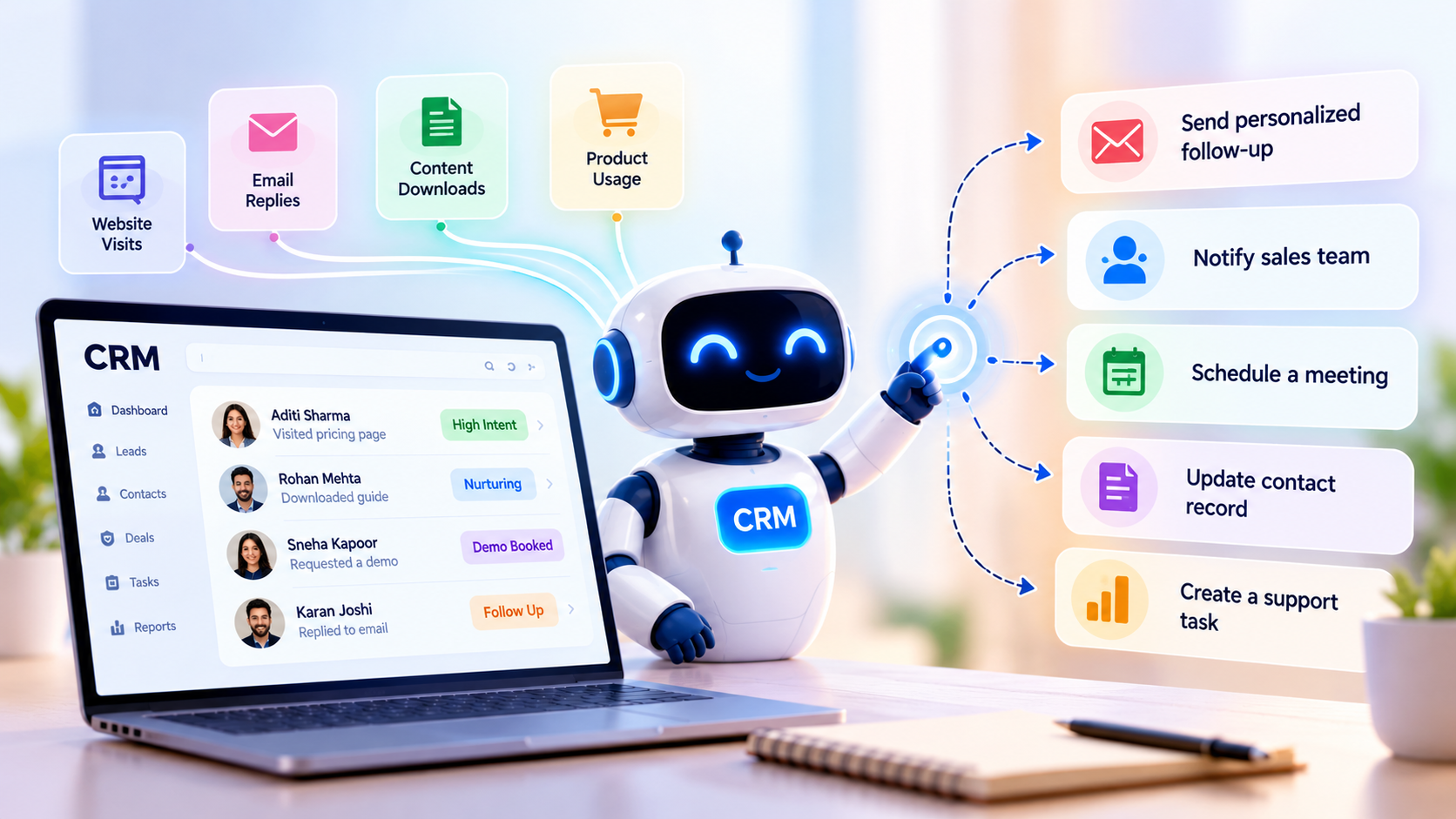
For years, businesses have used CRM systems to store customer details, track sales activity, and manage follow-ups. But storing information is only one part of the job. What if your CRM could understand a customer signal and take the next step without waiting for someone to click a button? That is where an agentic CRM comes in. It moves CRM from being a place where teams record information to a system that can act on it.
Think about a lead who visits your pricing page three times, downloads a guide, and then replies to an email. A traditional CRM records these activities. An action-oriented CRM can interpret the signals, assess the lead's intent, and recommend or carry out a relevant next step.
This shift is changing how businesses approach sales, marketing, and customer support. The question is no longer just what your CRM knows. It is what your CRM can responsibly do with that knowledge.
What Is an Agentic CRM?
An agentic CRM is a customer relationship management system that uses AI agents to interpret customer information, make decisions within defined boundaries, and perform tasks across the customer lifecycle.
A traditional CRM mainly stores and organizes data. An AI CRM may add predictive insights, content generation, or workflow automation. An agentic CRM takes this further by connecting customer signals to actions.
For example, it may:
- →Identify a lead who appears ready to speak with sales.
- →Send a personalized follow-up based on the lead's activity.
- →Update a contact record after a customer interaction.
- →Create a support task when a customer reports a recurring issue.
- →Notify an account manager when an important customer shows signs of disengagement.
The system does not need to act without human involvement in every situation. In many cases, it should recommend an action or request approval first.
The defining feature is its ability to move from insight to action within a clear set of business rules.
1. It Turns Customer Signals Into Meaningful Actions
Customers leave signals across different channels. These signals can include website visits, email replies, product usage, support tickets, purchase history, and sales conversations.
The challenge is that these signals often sit in separate tools.
An agentic CRM can bring relevant information together and use it to determine what should happen next.
Example of a customer signal
Imagine a B2B software company tracking a potential customer.
The prospect:
- →Visits the pricing page several times.
- →Opens a product comparison email.
- →Downloads a case study.
- →Returns to the website after a week.
A traditional CRM may show this activity in the contact timeline. A more action-oriented system can recognize a pattern that suggests buying interest.
It could then:
- →Increase the lead's priority.
- →Notify the assigned sales representative.
- →Prepare a personalized follow-up.
- →Suggest a meeting based on the prospect's previous interactions.
This does not mean every website visit signals purchase intent. The system needs context. A prospect researching a product for a school assignment should not receive the same treatment as someone evaluating vendors for an upcoming purchase.
That is why good CRM agents need both customer data and clear decision rules.
2. Autonomous Lead Nurturing Becomes More Personal
Lead nurturing often depends on fixed email sequences.
For example, a new lead receives an email on day one, another on day three, and a product offer on day seven. This approach is easy to manage, but it may not reflect what the lead actually does.
Autonomous lead nurturing uses customer behavior to decide when and how to continue a conversation.
An AI agent can respond to changes in customer intent instead of following only a fixed schedule.
How it can work
| Customer behavior | Possible CRM action |
|---|---|
| Downloads a beginner's guide | Send educational content |
| Visits the pricing page | Offer a product consultation |
| Replies with a specific question | Route the question to the right team |
| Books a demo | Pause promotional emails |
| Stops engaging | Reduce email frequency or change the nurture path |
The goal is not to send more messages. It is to make each interaction more relevant.
For example, if a lead books a demo, the CRM should not continue sending emails asking them to book one. That sounds obvious, but disconnected automation systems can create exactly this kind of experience.
An action-oriented CRM can use the latest customer signals to adjust the next step.
3. Sales Teams Spend Less Time on Routine Work
Sales representatives spend a significant part of their day updating records, preparing follow-ups, and checking task lists.
These activities matter, but they do not directly move every deal forward.
An agentic CRM can handle some of this routine work.
It may:
- →Summarize a sales call.
- →Update CRM fields based on the conversation.
- →Draft a follow-up email.
- →Create a task for the next meeting.
- →Identify missing information in a deal record.
- →Recommend the next action based on the sales stage.
Consider a sales call where a prospect says they need approval from their finance team before moving forward.
The CRM agent could record the objection, update the deal notes, draft a follow-up message, and suggest a reminder for the expected approval date.
A representative can review the work rather than entering every detail manually.
This is especially useful when teams handle a large number of opportunities. Still, the agent should not invent deal details or send sensitive messages without the required approval.
4. Customer Support Can Respond Before Problems Escalate
CRM is not only about acquiring customers. It also helps businesses keep existing customers satisfied.
Support teams often receive warning signs before a customer complains directly. These might include repeated support tickets, delayed payments, reduced product usage, or unresolved technical problems.
Customer agents can monitor these signals and help the team respond.
For instance, if a customer submits three tickets about the same issue, the CRM could:
- →Identify the recurring problem.
- →Combine relevant ticket details.
- →Assign the case to a specialist.
- →Notify the account manager.
- →Draft a customer update.
In some cases, an agent may resolve a straightforward issue by following an approved process. More complex cases should go to a human support representative.
The key is to reduce the time between identifying a problem and taking action.
5. Customer Retention Becomes More Proactive
Many businesses notice churn only after a customer cancels a subscription or stops buying.
By then, the opportunity to resolve the problem may have passed.
An agentic CRM can look for patterns that may indicate a customer is at risk. These could include:
- →A drop in product usage.
- →Fewer purchases than usual.
- →Repeated complaints.
- →Missed renewal conversations.
- →A decline in engagement with account communications.
The system can use these signals to recommend a retention action.
For example, a customer who has not used a key feature for a month may benefit from a training session. Another customer who has raised repeated billing concerns may need help from the finance team.
The response should depend on the reason behind the risk.
A CRM should not automatically send a discount to every customer with a low engagement score. That may waste budget and fail to address the real issue.
Instead, the system should help teams understand what is happening and choose a useful next step.
6. CRM Workflows Become More Flexible Than Fixed Rules
Traditional workflow automation usually follows a predefined structure.
For example:
If a lead fills out a form, assign the lead to a sales representative.
This works well for predictable tasks. But customer journeys are rarely that simple.
An agentic CRM can combine multiple signals and select an action based on context.
For example, a lead may:
- →Fill out a form.
- →Visit the pricing page.
- →Ask a technical question.
- →Mention a specific business requirement.
The CRM agent can use this information to determine whether the lead needs a sales conversation, technical consultation, or additional educational content.
This is a major difference between rule-based automation and agent-based workflows.
| Traditional CRM automation | Agentic CRM |
|---|---|
| Follows predefined triggers | Interprets context and signals |
| Executes fixed workflows | Selects from permitted actions |
| Often requires manual workflow updates | Can adapt within defined boundaries |
| Records customer activity | Connects activity to decisions and actions |
| Relies heavily on static conditions | Can use multiple sources of customer context |
Rule-based workflows will still matter. In fact, they can provide important boundaries for AI agents.
The future is likely to combine predictable automation with AI-driven decisions where context matters.
7. Human Oversight Becomes Part of the System
A CRM that takes action needs more than access to customer data. It also needs clear limits.
Not every action should be fully autonomous.
For example, an agent may be allowed to:
- →Draft a sales email.
- →Update a contact record.
- →Create a follow-up task.
- →Route a support ticket.
But it may need approval before it:
- →Sends a sensitive customer communication.
- →Offers a large discount.
- →Changes a contract.
- →Deletes customer information.
- →Makes a decision that could affect a customer's account access.
Businesses should define which actions an agent can perform, which actions require approval, and which actions are not allowed.
This is where governance becomes part of CRM architecture.
A useful system should also maintain an activity log showing:
- →What customer signal triggered the action.
- →Which data the agent used.
- →What action it selected.
- →Whether a person approved it.
- →What happened afterward.
This makes the system easier to review and helps teams identify errors before they become recurring problems.
How Will CRM Change When Workflows Become Autonomous?
The next stage of CRM is likely to focus less on managing individual tasks and more on coordinating customer journeys.
Instead of asking a sales representative to check every lead manually, the CRM may identify which leads need attention and prepare the relevant actions.
Instead of waiting for a support manager to notice repeated complaints, the system may detect the pattern and route the issue.
Instead of sending the same retention campaign to every customer, the CRM may recommend different actions based on each customer's situation.
This does not mean human teams will disappear. People will still need to handle judgment, relationships, complex decisions, and exceptions.
The role of the CRM may change from a system of record into a system that supports decisions and carries out approved work.
The biggest change will be how teams design their workflows. They will need to decide not only what data to collect, but also:
- →Which customer signals matter?
- →What action should follow each signal?
- →What decisions can an AI agent make?
- →When should a human step in?
- →How will the business measure whether the action worked?
These questions will become central to CRM planning.
How to Prepare Your CRM for Agent-Based Workflows?
You do not need to automate every customer interaction at once.
Start with a focused use case and build from there.
Step 1. Identify repetitive customer tasks
Look for work that takes time but follows a clear process.
Examples include lead assignment, follow-up reminders, call summaries, support ticket routing, and renewal alerts.
Step 2. Improve your customer data
AI agents depend on reliable information.
Review your CRM for duplicate contacts, missing fields, outdated records, and inconsistent lifecycle stages. If the data is inaccurate, the agent may make poor decisions.
Step 3. Define action boundaries
Decide which tasks the agent can complete independently and which need human approval.
Keep the first set of actions small and easy to review.
Step 4. Connect the right systems
A CRM agent may need information from your website, email platform, support system, billing tool, or product analytics platform.
Your MarTech architecture should support secure data access and reliable information sharing between these systems.
Step 5. Measure the results
Track practical outcomes such as:
- →Time saved per sales representative.
- →Lead response time.
- →Meeting booking rate.
- →Support resolution time.
- →Customer retention.
- →Percentage of agent actions approved or corrected by humans.
These measures will show whether the system is improving the customer experience or simply adding another layer of automation.
Frequently Asked Questions
What is an agentic CRM?
An agentic CRM uses AI agents to understand customer signals, make decisions within defined boundaries, and perform tasks across sales, marketing, and customer support. It goes beyond storing customer information or following fixed workflows.
How is an agentic CRM different from an AI CRM?
An AI CRM may use AI for forecasting, recommendations, summaries, or content generation. An agentic CRM focuses on using AI to select and carry out actions based on customer context. The two terms can overlap, but action is the central idea behind agentic CRM.
Can an agentic CRM automate lead nurturing?
Yes. It can use customer behavior, engagement, and lifecycle stage to select relevant follow-ups. For example, it may send educational content to a new lead or alert a sales representative when a prospect shows strong buying interest.
Will agentic CRM replace sales and marketing teams?
No. It can reduce repetitive work and help teams respond faster, but people still need to manage relationships, handle complex situations, review sensitive decisions, and set business priorities.
What data does an agentic CRM need?
It may use contact details, purchase history, website activity, email engagement, sales conversations, support tickets, and product usage data. The exact data depends on the workflow and the permissions granted to the agent.
The Next CRM Advantage Will Come From Better Actions
A CRM becomes more useful when it does more than record what happened.
It can help a business understand customer signals, choose the next step, and carry out routine work. That can make sales follow-ups more relevant, support more proactive, and retention efforts more timely.
Still, the value does not come from giving AI unlimited control. It comes from combining reliable customer data, clear workflows, defined permissions, and human oversight.
For businesses planning the next stage of their MarTech architecture, the real question is simple.
Can your CRM recognize what a customer needs and take the right action at the right time?
That is the shift from storing customer data to acting on it.
If you are reviewing your current CRM setup, start by mapping the customer signals, systems, and workflows that could benefit from agent-based action. A focused MarTech architecture review can help you identify where autonomous workflows make sense and where human approval should remain part of the process.
Related Insights

Are AI Ad Platforms Making Marketers Better at Performance - or Just Better at Spending?
Are AI ad platforms making marketers better or just spending faster? Explore AI performance marketing, automated bidding, AI optimisation, and smarter paid media.

Social Listening Is Becoming AI Consumer Intelligence - Here’s What Changes!
Discover how AI social listening turns millions of conversations into consumer intelligence, themes, needs and early signals for smarter marketing and product decisions.

SEO Is No Longer the Whole Search Journey: Where Do Indians Ask AI Instead?
AI search in India is now becoming part of how people discover information, compare choices and decide what to do next across search engines, AI assistants, maps and marketplaces.
Ready To Make Your Stack Work Together?
Bring us the complexity. We'll help turn disconnected platforms, data and workflows into a MarTech system built around your business.